Find the hours that work for everyone
The meeting planner gives each city a 24-hour row, shades its working hours and its night, and outlines the hours when everyone is at work. It’s part of Open World Clock, one click away on your desktop.
- Hours and days per city
- Night shifts
- Overlap summary
- Works offline
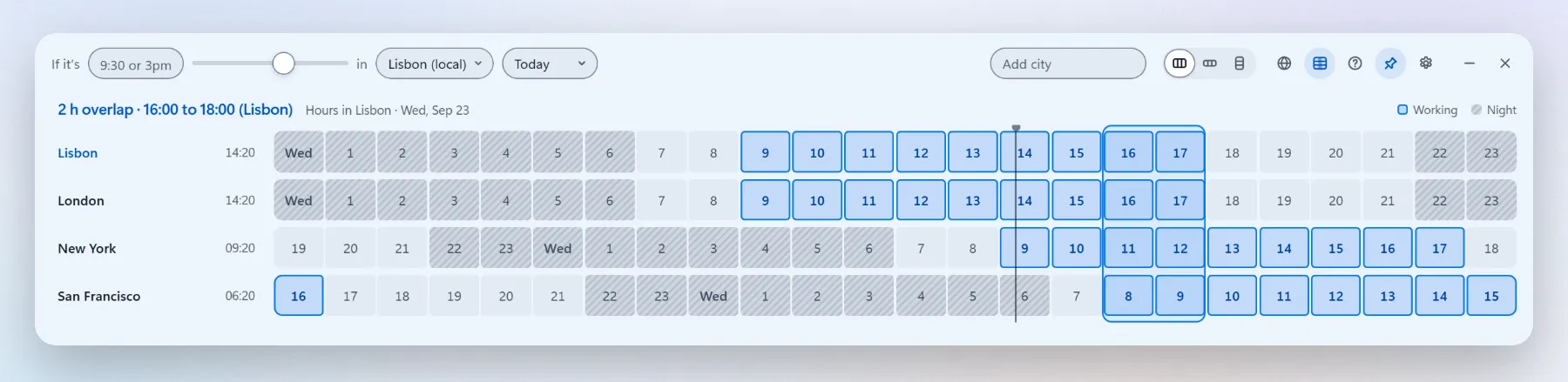
Find a meeting time in four steps
- Add the cities. Type each one in the Add city box. Search works by name, country, abbreviation or UTC offset.
- Open the planner. Select the planner button in the top bar. Each city gets a 24-hour row.
- Set each city’s hours. Click a city’s name to set its working hours and days. Every city starts at 09:00 to 18:00, Monday to Friday.
- Pick an hour. Click an hour inside the outlined overlap. Every clock converts to it, and Copy times puts the result on your clipboard.
How to read the grid
Columns are the source city’s hours
The 24 columns are the hours of the chosen day in the converter’s city. Each row shows what time that is locally.
Three kinds of hour
Blue is working time for the whole hour, dark is night (22:00 to 07:00 local), plain is off hours.
The overlap
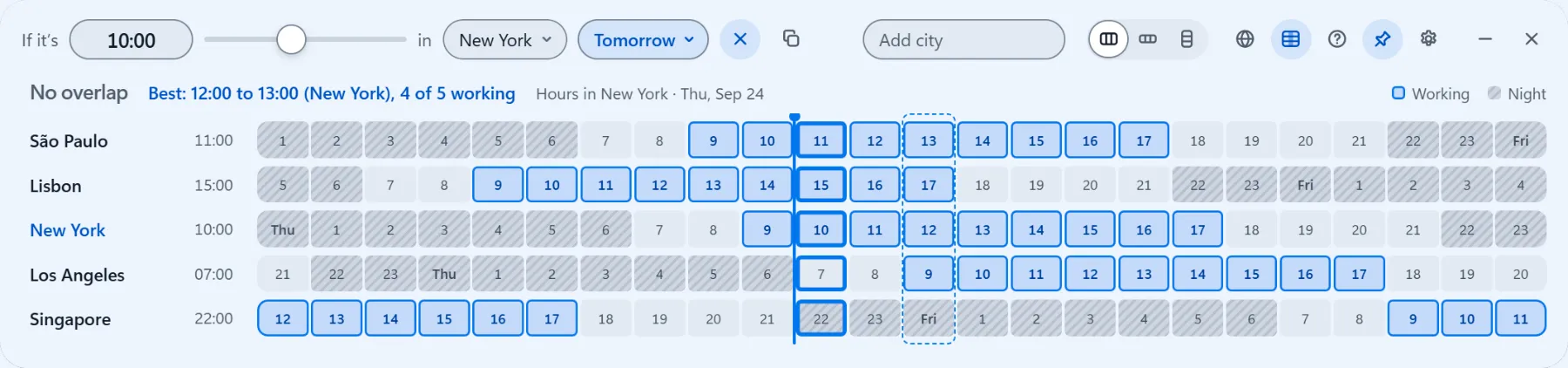
Hours where every city is working are outlined, and the top line sums them up. A second block adds “+1 more”; none at all says “No overlap”. When no hour works for everyone, the planner outlines the hours when the most cities are at work and names who is outside their hours, for example “Best: 12:00 to 13:00 (New York), 4 of 5 working”.
Now, and the rest of the week
A thin line marks the current time. The date shortcuts (Today, Tomorrow and the next five days) show the days ahead.
Keyboard
Arrow keys move through hours and cities; Home and End jump to the first and last hour.
Your time zone, your format
Hours follow your 12 or 24-hour setting, and cities keep the labels you gave them.
Working hours and days, per city
Teams don’t all work 9 to 6, Monday to Friday. Each city keeps its own start, end and working days, so an office in Riyadh can work Sunday to Thursday and a support desk in Manila can work nights. Reset puts a city back to the default. The hours are saved with your settings, on your PC.
Night shifts
Set an end time earlier than the start, say 22:00 to 06:00, and the editor notes “Ends the next day”. The whole shift belongs to the day it starts: a shift that starts on Friday evening runs until Saturday morning.
Example: a team in Manila working 22:00 to 06:00, Monday to Friday, and an office in New York on 09:00 to 18:00. The planner shows 8 h overlap · 10:00 to 18:00 (New York), because Manila’s night is New York’s working day.
Worked examples
Real results from the planner. Default hours are 09:00 to 18:00, Monday to Friday.
| Cities and hours | The planner says |
|---|---|
| Lisbon, London and New York, all on 09:00 to 18:00 | 4 h overlap · 14:00 to 18:00 (Lisbon) |
| Add San Francisco, also 09:00 to 18:00 | 1 h overlap · 17:00 to 18:00 (Lisbon) |
| San Francisco on 08:00 to 16:00 instead | 2 h overlap · 16:00 to 18:00 (Lisbon) |
| Tokyo, London and New York | No overlapBest: 17:00 to 18:00 (Tokyo), 2 of 3 working |
| Tokyo and London | 1 h overlap · 17:00 to 18:00 (Tokyo) |
| New York, plus Manila on 22:00 to 06:00 | 8 h overlap · 10:00 to 18:00 (New York) |
| London, plus Riyadh on 09:00 to 17:00, Sunday to Thursday, on a Thursday | 6 h overlap · 09:00 to 15:00 (London) |
| The same two cities on a Friday | No overlap |
Wednesday 23 September 2026 unless noted (Thursday 24 and Friday 25 September for Riyadh). Default hours unless noted. The source city is in brackets. With no shared hour, the Best line shows the hours when the most cities work; in the Friday row only London works, so there is no Best line.
When the clocks change
Clocks change on different dates around the world, and the planner uses each day’s own rules. London and New York share 4 working hours on 21 October 2026, but 5 on 28 October, because Europe has already turned its clocks back and the US waits until 1 November. The same thing happens for two weeks in March. Worth a look before you set up a recurring meeting.
More about Open World Clock
Put the world on your desktop
Completely free for Windows 10 and 11. Open source, no account, no ads, no telemetry.