A World Time Buddy alternative for Windows
Compare times in your browser, or keep them above your work in the free Windows app. Here’s how Open World Clock and World Time Buddy compare.
Free for Windows 10 and 11, x64, about 90 MB. It isn’t code-signed yet, so SmartScreen may warn you the first time (what to do).
- Free
- Native Windows app
- Works offline
- No account
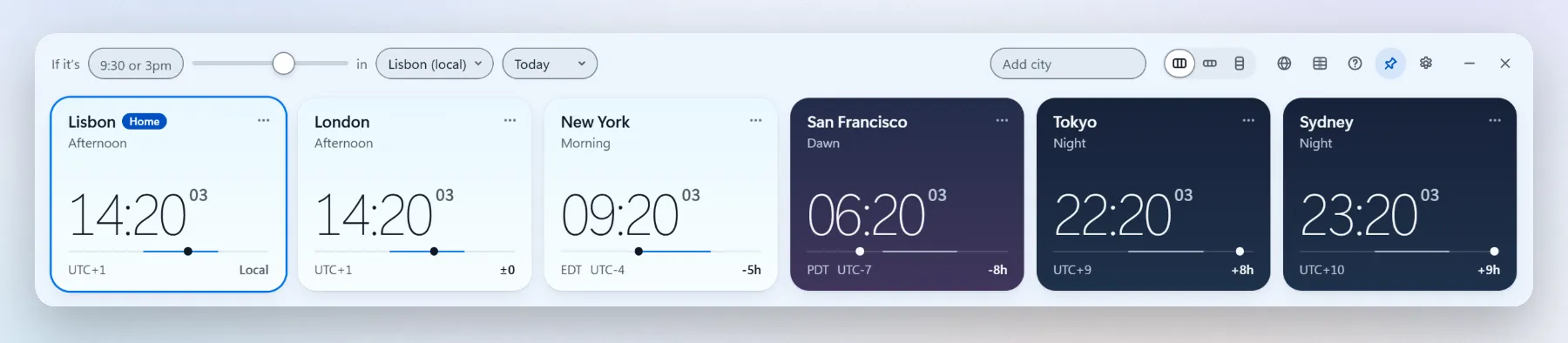
Side by side
Swipe to see the other columns
| Feature | Open World Clock | World Time Buddy |
|---|---|---|
| Price | Free, MIT open source, no ads | Free website, with ads |
| Where it lives | Windows desktop or browser | A browser tab |
| Windows app | Yes, for Windows 10 and 11 | No, you use the website |
| Hour grid with every city | Yes, the meeting planner | Yes, its signature hour tiles |
| Working hours and days per city | Yes, night shifts included, with the overlap outlined | Not in the same way |
| Convert a time | Type 3pm in any city, or scroll the mouse wheel | Pick an hour on the grid |
| Stays above other windows | Yes, if you pin it | No, it’s a tab |
| Works offline | Windows app: yes. Browser: connection needed to load. | No, the website needs a connection |
| Account | None, ever | Optional sign-in to keep your settings |
| Share the result | Copy times, export a calendar event, or share a browser link | A link to your current view |
| Runs on | Windows 10 and 11; any modern browser | Any browser, phones included (its iPhone and Android apps haven’t been updated since 2020) |
Based on worldtimebuddy.com in September 2026. World Time Buddy may have changed since; tell me if something here is out of date.
What World Time Buddy does well
The hour grid is a great idea, and World Time Buddy does it well: a row of hours for each city, lined up, so the hour that suits everyone jumps out. It works in any browser, phones included, and you can send a colleague a link to exactly what you see.
If you plan meetings from your phone, or on a computer where you can’t install anything, it’s a good choice. On a PC you can’t install software on, you can also try Open World Clock live in the browser.
Why a Windows app for the same job
If you work with people in other time zones every day, a browser tab is one more thing to find, reload and sign in to. Open World Clock keeps your cities on the desktop, above every window if you pin it, and it answers “what time is it there?” without opening anything.
It runs on your PC, so it works offline, loads nothing from the internet and has no ads, no account and no telemetry. The code is open, MIT licensed, on GitHub.
The hour grid, with working hours
The meeting planner lines up a 24-hour row for each of your cities and outlines the hours when everyone is at work.
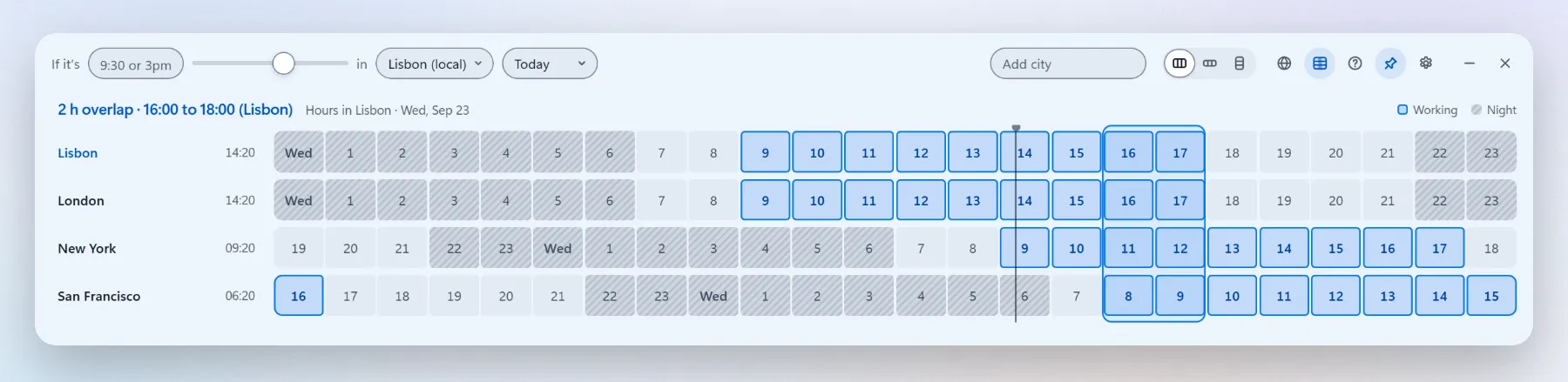
Working hours per city
Each city keeps its own start, end and working days, so an office that works Sunday to Thursday or a night shift fits in.
The overlap, summed up
Shared working hours are outlined, with a line like “2 h overlap · 16:00 to 18:00 (Lisbon)”.
When nothing fits
It outlines the hours when the most cities are at work, for example “Best: 12:00 to 13:00 (New York), 4 of 5 working”.
Daylight saving, per day
Each day uses its own rules, so the weeks when Europe and the US change clocks on different dates come out right.
Converting a time
Type a time such as 3pm, 9:30 or 15h30, pick the city it belongs to, and every clock shows the matching time, with +1 day where the date changes. Or turn the mouse wheel over any card to move every city in 15-minute steps. Copy times puts the whole list on the clipboard, ready to paste into an invite. More about the time zone converter.
Which one should you use?
- On your phone, or on a computer you can’t install anything on: Both work in the browser. Open World Clock also offers a free, offline Windows app.
- A link to send someone: Both can share a link. Open World Clock can also copy times and export a calendar event.
- Your cities in view all day on a Windows PC, and meetings across them, offline and without ads: Open World Clock.
World Time Buddy is a trademark of its owner. Open World Clock isn’t affiliated with World Time Buddy or with Microsoft.
More about Open World Clock
Put the world on your desktop
Completely free for Windows 10 and 11. Open source, no account, no ads, no telemetry.
Free for Windows 10 and 11, x64, about 90 MB. It isn’t code-signed yet, so SmartScreen may warn you the first time (what to do).